Software Design
正文
- 不设计,会产生技术债务;
- 设计过度,可能浪费时间;
- 需求必然可能变化;
- 合理目标不是一开始写出完美代码,而是写出当前足够好、易于修改的代码。
实际开发中更合理的策略是:
适度设计 + 小步实现 + 自动化测试 + 持续重构
Design a New Feature for Our Project
See all your branches as follows:
git branch --all
Software Architecture
软件架构设计可以先通过“方框 + 连线”把系统结构画出来。
1. 方框表示组件
每个方框可以代表:
- 一个代码模块;
- 一个服务;
- 用户;
- 数据库;
- 外部系统。
例如:
[用户] → [Web 界面] → [分析模块] → [数据库]
这样可以直观看出系统由哪些部分组成,以及每部分负责什么。
2. 连线表示接口
组件之间的连线表示:
- 数据传递;
- 函数调用;
- 控制流程;
- 网络请求。
例如:
[文件读取模块] ──数据──> [计算模块]
连线不仅表示“两个模块有关”,还应考虑:
- 传递什么信息;
- 信息格式是什么;
- 谁调用谁;
- 是否需要返回结果。
这些交互方式就是系统的接口。
Exercise and Solution
Exercise: Design a High-Level Architecture for a New Requirement
Sketch out an architectural design for a new feature requested by a user.
“I want there to be a Google Drive folder such that when I upload new inflammation data to it, the software automatically pulls it down and updates the analysis. The new result should be added to a database with a timestamp. An email should then be sent to a group mailing list notifying them of the change.”
You can draw by hand on a piece of paper or whiteboard, or use an online drawing tool such as Excalidraw.
Solution
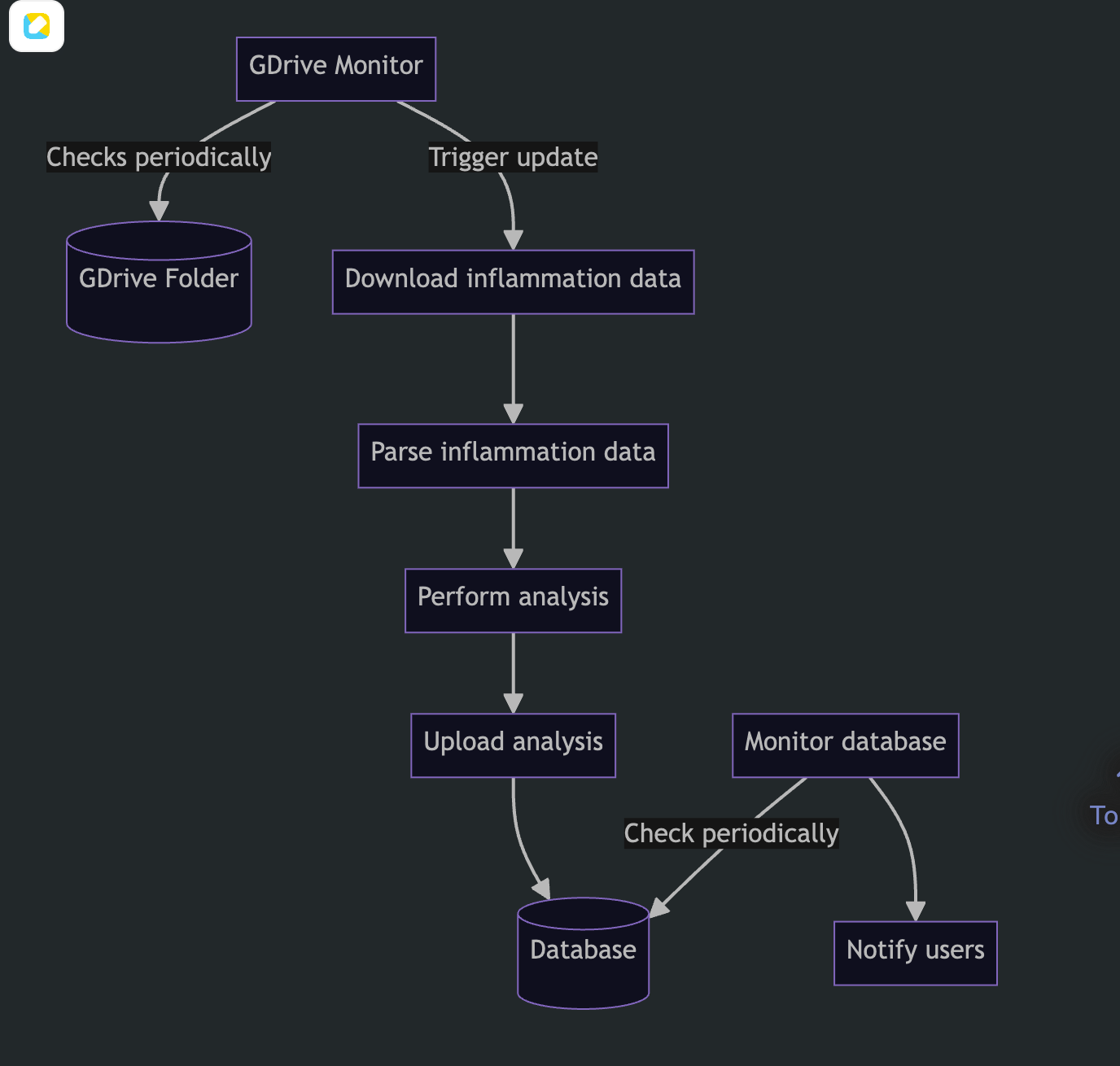
矩形:处理模块或服务
圆柱体:数据存储
箭头:调用、触发或数据流 箭头旁文字:接口或触发方式
MVC Architecture
Model:数据和业务逻辑 View:用户看到和操作的界面 Controller:接收输入并协调 Model 与 View
Architectural Design Guidelines
Creating good software architecture is not about applying any rules or patterns blindly, but instead practise and taking care to:
- Discuss design with your colleagues before writing the code.
- Separate different concerns into different sections of the code.
- Avoid duplication of code or data.
- Keep how much a person has to understand at once to a minimum.
- Try not to have too many abstractions (if you have to jump around a lot when reading the code that is a clue that your code may be too abstract).
- Think about how will your components interface other components and external systems.
- Not try to design a future-proof solution or to anticipate future requirements or adaptations of the software - design the simplest solution that solves the problem at hand.
- (When working on a less well-structured part of the code), start by refactoring it so that your change fits in cleanly.
- Try to leave the code in a better state that you found it.
重构前最好有测试
重构要求外部行为不变,但如果没有测试,很难确认行为是否真的没有变化。
推荐流程:
为现有行为补测试
→ 小步重构
→ 每一步运行测试
→ 确认行为不变
重构应当小步进行
不建议一次重写整个项目。
更可靠的方式:
改一个名字
→ 运行测试
→ 提取一个函数
→ 运行测试
→ 消除一处重复
→ 运行测试
小步重构有两个好处:
- 出错时容易定位;
- 每一步都容易审查和回滚。